Stop waiting on invoices: accurate accruals from vendor billing APIs
 Francisco Meyo · 7 min read
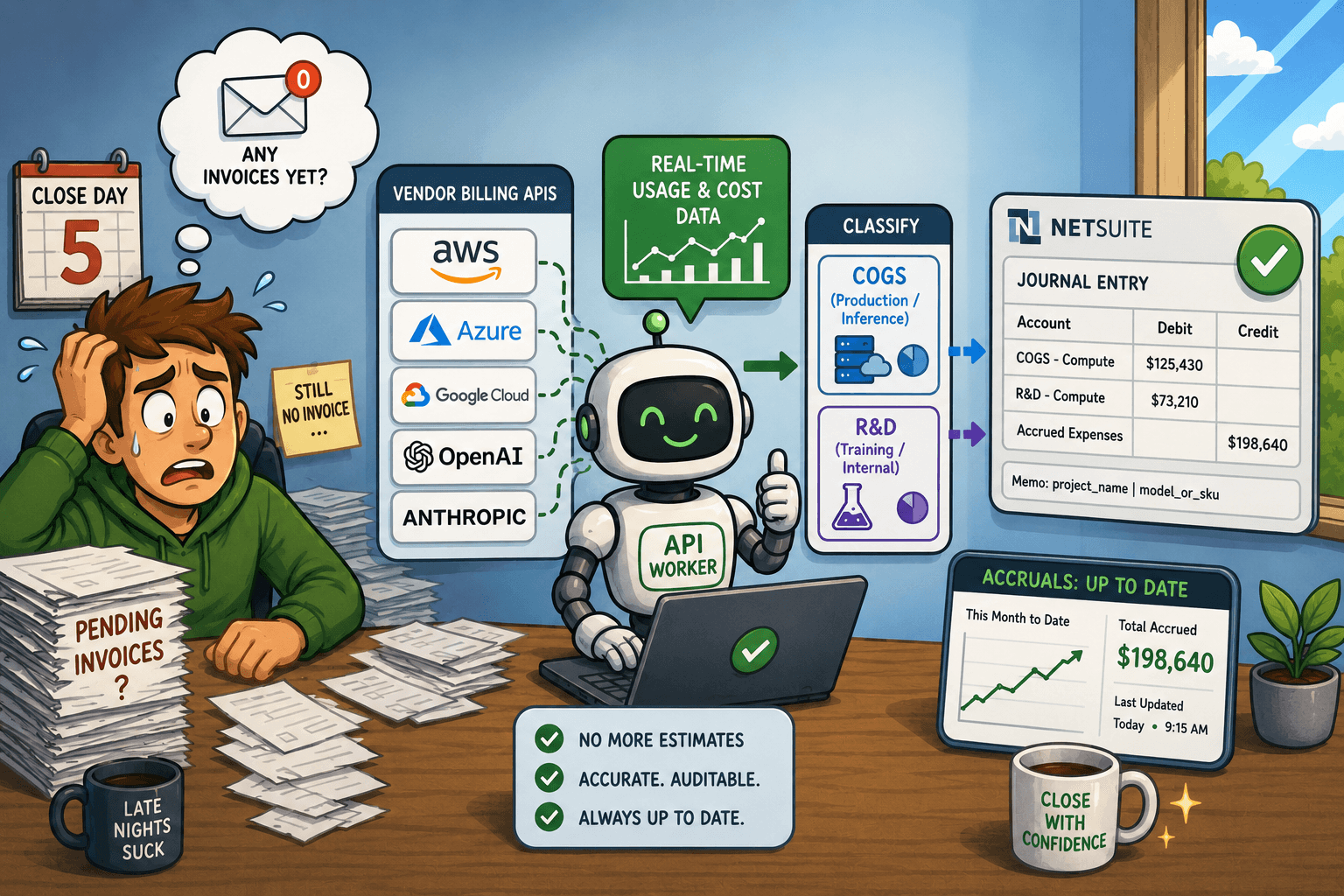
The goal of every finance team shouldn't be to close on business day 5. It should be to never need a close in the first place. Continuous close is the real target — and for AI companies, the biggest blocker standing in the way is accurate, timely accruals for compute and inference costs.
Here's how to eliminate that blocker entirely.
1. Most of the close is already solved
A continuous close is achievable because the majority of transactions are already recording themselves.
Cash is covered. Tools like Ramp and Stripe post transactions in real time — vendor payments, card spend, and revenue receipts don't wait for month-end. Your ERP handles the rest: prepaid amortization schedules run automatically, fixed asset depreciation fires on schedule, and intercompany eliminations can be templated. NetSuite, for instance, will run your amortization waterfall on day one of the month with a couple of clicks.
What's left is accruals — especially, the liabilities you need to record for services consumed but not yet invoiced. For AI companies, the main ones are related to compute and inference.
2. The accrual problem is an invoice timing problem
The reason accruals are hard isn't accounting — it's information lag.
By the time you're closing January, AWS hasn't sent the January bill yet. OpenAI doesn't invoice until the first week of February. Azure's cost-analysis export takes a few days to finalize. So you're left estimating, which means either a fat round-number accrual that you'll true-up next month, or a team member manually pulling numbers from a vendor portal the night before close.
Neither is good enough for a continuous close. And for AI companies, this isn't a rounding-error problem — compute represents a high % of cost of revenue. Getting it wrong materially distorts your gross margin, your R&D spend, and anything downstream that depends on those numbers.
3. Every major compute vendor has an API — use it
The solution is already available. AWS, Azure, GCP, OpenAI, and Anthropic all expose billing and usage APIs that let you pull consumption data at any point in the month, down to the day. You don't need to wait for the invoice. You can pull actuals.
The pattern is the same across vendors:
- Authenticate to the vendor's billing API
- Fetch usage data for the period, grouped by project, model, or SKU
- Map to expense accounts (COGS vs. R&D)
- Push a journal entry to your ERP, in this example, NetSuite
Here's what this looks like in practice for OpenAI:
def fetch_openai_costs(api_key, start_ts, end_ts, bucket_width="1d", group_by=None):
    url = "https://api.openai.com/v1/organization/costs"
    headers = {"Authorization": f"Bearer {api_key}"}
    all_buckets = []
    page = None

    while True:
        params = [
            ("start_time", start_ts),
            ("end_time", end_ts),
            ("bucket_width", bucket_width),
            ("limit", 100),
        ]
        if group_by:
            for g in group_by:
                params.append(("group_by[]", g))
        if page:
            params.append(("page", page))

        resp = requests.get(url, headers=headers, params=params)
        js = resp.json()
        all_buckets.extend(js.get("data", []))
        page = js.get("next_page")
        if not page:
            break

    return all_buckets
You call this with group_by=["project_id", "line_item"] and you get daily usage broken down by OpenAI project and model. Not an estimate — actual consumption data, updated daily.
For Azure, the same concept applies via the Consumption API:
def fetch_costs_azure(token, subscription_id, start_date, end_date):
    url = (
        f"https://management.azure.com/subscriptions/{subscription_id}"
        f"/providers/Microsoft.Consumption/usageDetails"
        f"?api-version=2023-05-01&startDate={start_date}&endDate={end_date}"
    )
    headers = {"Authorization": f"Bearer {token}"}
    rows = []
    while url:
        resp = requests.get(url, headers=headers)
        js = resp.json()
        for item in js.get("value", []):
            props = item.get("properties", {})
            rows.append(props)
        url = js.get("nextLink")
    return rows
Both APIs paginate, both return granular line-item data, and both let you pull at any point during the month — not just after billing closes.
4. Classification at the source: COGS vs. R&D
Pulling the cost is only half the job. The other half is knowing where to put it.
In an AI company, compute spend isn't all the same. A production inference workload serving customers belongs in cost of revenue. A model fine-tuning job running in your staging environment belongs in R&D. The vendor doesn't make that distinction for you — but your project naming conventions can.
For OpenAI, you can use project IDs to drive the classification:
# Projects whose spend is R&D; everything else → COGS
RND_PROJECT_IDS = [
    "proj_example0000000000000offline",  # Offline Workloads
    "proj_example0000000000000evaltsk",  # Eval Workloads
]

df["account"] = df.apply(
    lambda row: RND_ACCOUNT_ID if row["project_id"] in RND_PROJECT_IDS else COGS_ACCOUNT_ID,
    axis=1,
)
For Azure, you can use resource names — the production cluster gets the COGS account, everything else gets R&D:
PRODUCTION_RESOURCE_NAME = "azure-openai-uswest3-production"

df["account"] = df["resource_name"].apply(
    lambda x: COGS_ACCOUNT_ID if x == PRODUCTION_RESOURCE_NAME else RND_ACCOUNT_ID
)
This isn't an allocation percentage. It's exact — by resource, by project, by line item. Your R&D-to-COGS split becomes auditable and reproducible, not a judgment call made the night before close.
5. Push to NetSuite without touching a spreadsheet
Once the data is structured and classified, the journal entry builds itself.
Each line item from the vendor API becomes a debit line in the journal — with the memo field carrying the full dimension detail (project_name | model_or_sku). A single credit line offsets the full total against your accrued expenses liability account:
def prepare_journal_entry(df, report_date, posting_period, posting_period_id):
    lines = []
    for _, row in df.iterrows():
        lines.append({
            "account":    {"id": str(row["account"])},
            "debit":      round(float(row["amount"]), 2),
            "department": {"id": str(row["department_id"])},
            "class":      {"id": str(row["class_id"])},
            "entity":     {"id": VENDOR_ENTITY_ID},
            "memo":       str(row["memo"]),
        })

    # Integer cents to avoid floating-point drift across many lines
    total_debit_cents = sum(round(line["debit"] * 100) for line in lines)
    total_debit = total_debit_cents / 100

    lines.append({
        "account": {"id": ACCRUED_EXPENSES_ACCOUNT_ID},
        "credit":  total_debit,
        "memo":    f"Usage fees for the month ending {report_date}",
    })

    return {
        "tranDate":      report_date,
        "postingPeriod": {"id": str(posting_period_id)},
        "approved":      True,
        "memo":          f"OpenAI API cost accrual for the month ending {report_date}",
        "line":          {"items": lines},
    }
Post this to NetSuite's REST API and the entry is live — approved, period-locked, and ready for review. No spreadsheet, no manual import, no re-keying data. The same script that fetches the costs builds the entry and posts it.
You can run this on day one of the following month for a clean month-end accrual, or daily if you want intra-month cost visibility in your P&L.
6. The data enrichment you get for free
Here's the part that doesn't get talked about enough: you're not just closing faster — you're closing with better data than you'd get from the invoice.
A standard vendor invoice tells you the total. The API tells you the total broken down by model, by project, by day, by SKU. That means:
- Your COGS is split by model (GPT-4o vs. GPT-4o-mini vs. o3), so you can see which model is driving unit economics
- Your R&D spend is split by workload type (eval jobs vs. fine-tuning vs. offline batch)
- Every journal line has a memo field with the exact resource and meter, making variance analysis instant
When your CFO asks why gross margin dropped 2 points in March, you can answer in minutes, not days. That's the compounding benefit of automating at the API layer instead of the invoice layer.
FAQ
Q: Can I do this for AWS and GCP too, not just OpenAI and Azure? Yes — AWS exposes cost data via the Cost Explorer API (boto3.client("ce")), and GCP via the Cloud Billing API or BigQuery billing exports. The pattern is identical: authenticate, pull usage data grouped by service and label, map to accounts, post to your ERP. Anthropic's API usage is available through the Console's usage endpoints as well.
Q: What if the vendor's API data doesn't exactly match the final invoice? It's typically within 1–2% — close enough that the true-up when the invoice arrives is immaterial. You book the accrual based on API data, then when the actual bill comes in you reverse the accrual and record the invoice. If you're running this daily, your accrual is already fresh and the true-up is minimal.
Q: Do I need to be an engineer to build this? No — but you need to be comfortable with Python and REST APIs. The full scripts for OpenAI and Azure are about 150–200 lines each, including pagination, error handling, and the NetSuite push. If you've ever written a Pandas transformation or called an API with requests, you can build this. That's exactly the gap this blog is designed to close.
Q: How does this interact with my existing bill-pay workflow? The accrual posts at month-end: debit expenses across however many lines the API gives you, credit accrued liabilities. When the invoice arrives, you debit the accrual and credit AP — the expense was already booked in full detail, the invoice is just settling the liability. Any true-up between the accrual and the invoice amount is typically negligible.
Day-5 close is a proxy metric for a problem that's already solved. The real goal is a P&L that reflects reality continuously — and for AI companies, that means automating the one accrual that actually moves the needle. Compute costs are big, granular, and fully API-accessible. There's no reason to estimate them.
Run the script. Post the entry. Close on day one.
Want to give it a shot? You can see the whole code in theaccountantthatcodes github repo.
As Controller, I've built and maintained this architecture across multiple cloud providers and billing systems. The patterns here are production-tested, not theoretical.
Last updated: July 2026.